Unfortunately, the UTMs aren't going to organize themselves.
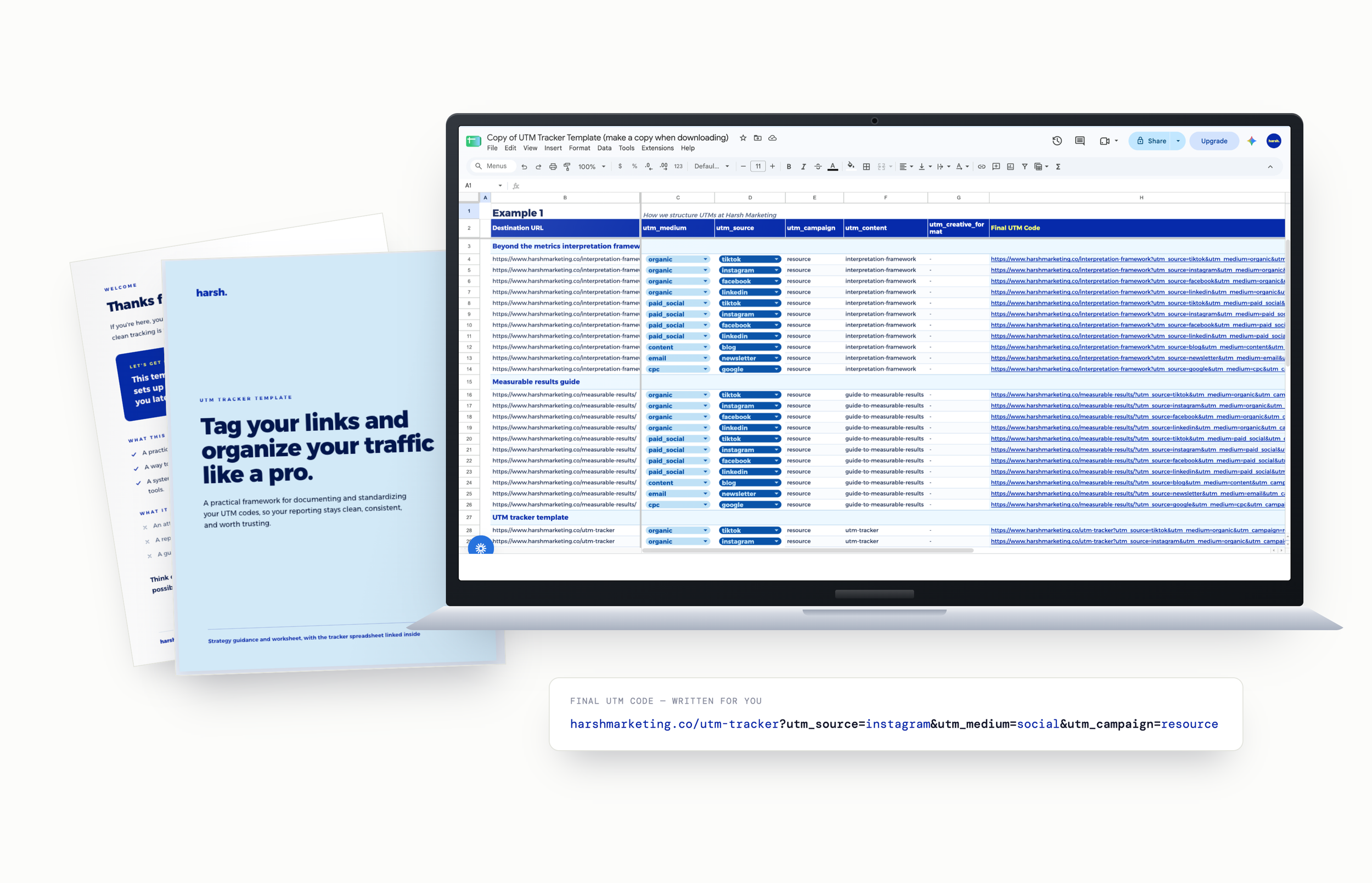
So we built the thing that does it for you. Fill in a few columns, and the tagged link writes itself. Every link you publish, documented in one place.
Next time someone asks which campaign actually drove it, you have a real answer.
Get the UTM tracker →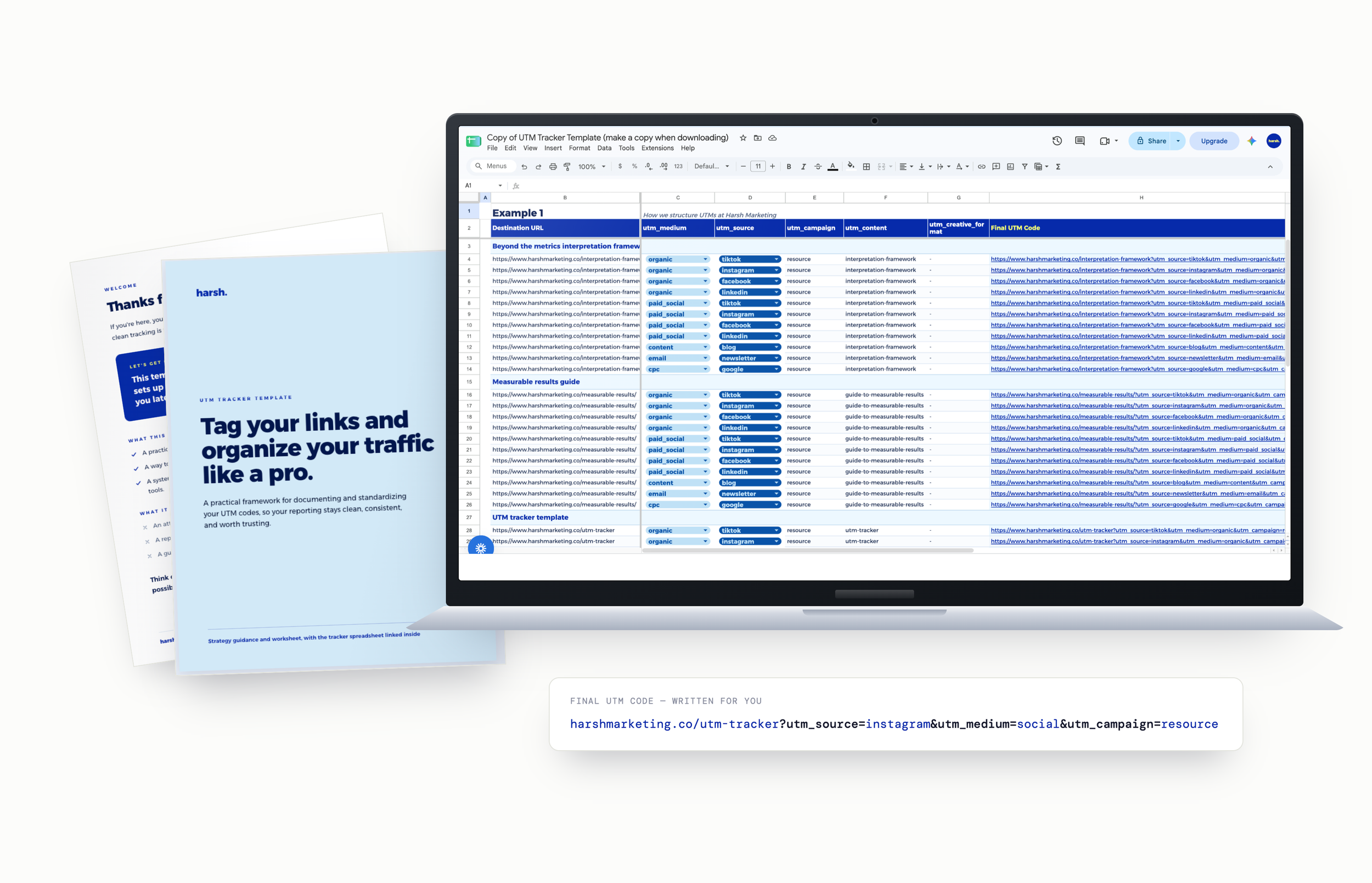
Never touched a UTM before? You're fine.
UTMs are just little labels you stick on a link so your analytics can tell you where someone actually came from. That's genuinely it.
No because what do you mean you just fill in a few columns and the link writes itself!? Yes. That is what we mean.
And if you want the theory, the strategy guide has it: what every field is for, two full examples broken down, plus exercises so you can practise on something that isn't your live campaign.
“Guessing which platform actually drove the traffic?”
Not us anymore. But if any of this is still you:
Let's fix this now!
Clean analytics start before the click. Get the links right on the way out and your reporting gets a lot less painful.
The UTM Tracker is the whole system: name it, build it, document it. So your reports run on clean inputs instead of educated guessing.
Here's what you get:
The UTM Documentation Template
One spreadsheet that holds every tagged link you publish, organised by platform, campaign and purpose. Your permanent record of what went out and when.
Links That Write Themselves
Fill in the columns, and the Final UTM Code column spits out the full tagged URL. No hand-typing, no typos, no mystery broken links.
Two Fully Worked Examples
A paid social campaign and an organic resource link, tagged from start to finish across every platform, so you can see the logic before you apply it.
Your Own Practice Sheet
A clean tab set up and ready to go, with the formulas already in place. Start documenting your real links the moment you open it.
The Strategy Guidance Document
The thinking behind the sheet: what each parameter is for, how to choose a naming convention you can stick to and a breakdown of both examples.
A Naming Convention That Sticks
The part everyone skips. Decide your sources, mediums and campaign names once, and every report after that lines up. Across platforms, teams and clients.
You fill the left. It writes the right.
One row from the worked paid social example. Type the bits you know, the tagged link comes out the other end.
Nothing to connect and nothing to install. It's a spreadsheet, open it wherever you already work.

This is the sheet we wished every client had handed us on day one.
We spent 10+ years together at a marketing agency, working with 300+ organizations. A lot of the reporting problems we inherited started in the same place: links that went out untagged, or tagged three different ways by three different people.
So we built a tracker we used on every account and a naming convention we actually stuck to. That's what's in here.
The UTM Tracker & Strategy Guide
one-time · USD · yours to reuse
The spreadsheet and the strategy guide, together. Use it on every brand and client you work on.
Get the UTM trackerInstant download. Works in Excel or Google Sheets.
A free link builder isn't a system.
They build one link and forget it existed. Nothing saved, nothing consistent, and next month nobody remembers what you typed.
Facebook one week, fb the next, FB after that. Analytics counts all three as different sources and your totals quietly fall apart.
Choose from the dropdown. Copy the link. Done. One convention, built by formula, with a record of every link you've ever published.
Tag the next link properly.
Everything you publish from here is traceable. That is the whole difference.
Yes, I need this! →Limited time offer · $39 $12
The tracker makes sure your data comes in clean. Our Reusable Marketing Report Template is where you read it, 19 reporting pages for GA4, Search Console, Google Ads and social, with a written guide and setup videos.
See the reporting template →Two files. The UTM Documentation Template, a spreadsheet with two fully worked examples, your own practice sheet and an instructions tab, plus the Strategy Guidance and Worksheet document that explains the thinking and walks you through the examples.
A short label added to the end of a link. When someone clicks it, your analytics reads the label and can tell you the visit came from your Instagram story rather than lumping it in with everything else. That's it.
Yes. It's an .xlsx file, so it opens in Excel and you can upload it to Google Sheets or Numbers and work there instead. Make a copy before you start typing so you always have the original.
No. You type into columns; the tracker builds the link. The two worked examples show you what good looks like and the strategy guide explains every field in plain language before asking you to fill anything in.
Yes. Buy it once and duplicate the sheet per brand, site or client. No per-client license, no seat limits.
GA4 is where you'd read the results and tagging is what makes those reports trustworthy. But the documentation value stands on its own: even without analytics set up yet, you'll have a consistent record of every link you've published.
No. One payment of $12 USD, files are yours, no renewal.
Know exactly where your traffic is coming from, with a done-for-you UTM tracker that builds clean links and documents every one of them.
Tired of half your traffic showing up as "direct" and having no idea what it actually was? This tracker fixes the problem at the source, before the click.
Fill in the columns: source, medium, campaign, content, creative format — and the sheet writes the full tagged URL for you. No manual string-wrangling, no typos, no broken links. Every link you publish gets recorded in one place, so months later you can still see exactly how it was tagged.
What's included:
The UTM Documentation Template (spreadsheet, .xlsx)
Two fully worked examples — one paid social campaign, one organic resource link
Your own practice sheet, formulas already in place
An instructions tab
The Strategy Guidance & Worksheet document — what each parameter is for, how to pick a naming convention you'll stick to, and a breakdown of both examples
Works in Excel, Google Sheets or Numbers. Nothing to install, nothing to connect. Buy once and duplicate it per brand or client.
Because no dashboard can fix dirty data. Clean tags in, clear reports out.
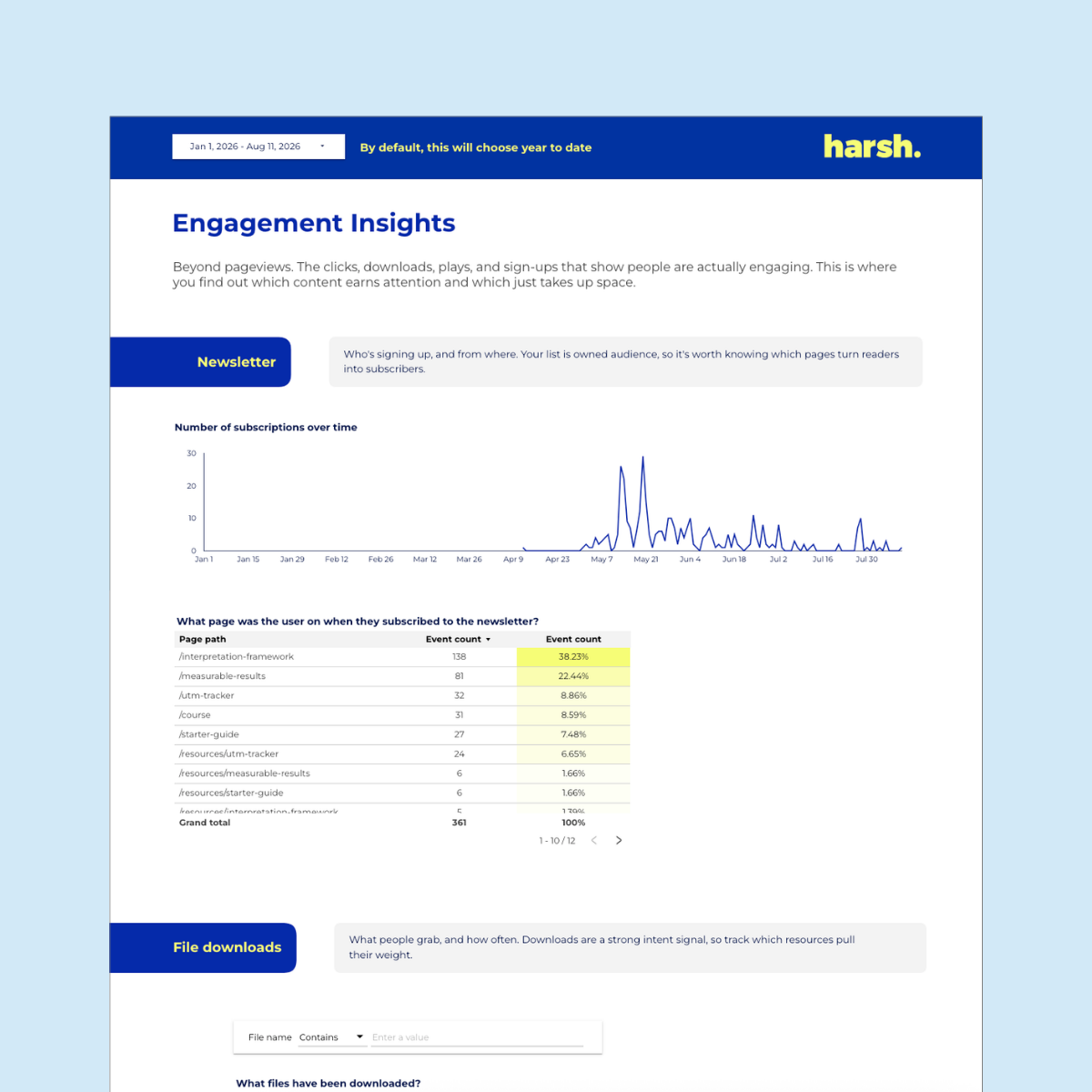
Your web, SEO, paid and social data… pulled into one live Google Data Studio dashboard that updates itself.
Tired of spending hours copy/pasting numbers just to build one report? This template hands that time back to you. Less reporting, more deciding.
Connect it once to four data sources (GA4, Google Search Console, Google Ads, and Metricool) and it covers every platform that matters: organic and paid search, Google Business Profile, Instagram, Facebook, TikTok, LinkedIn, Pinterest, and Meta Ads. Ready-made pages for traffic, key events, engagement, page breakdowns, and channel-by-channel social.
What you get:
✔️ A welcome PDF with links to everything you need
✔️ The full reusable Data Studio, formally know as “Looker Studio” dashboard
✔️ A step-by-step setup guide + video walkthroughs
✔️ Map it to your own data with a simple copy
✔️ Free updates, forever
Heads up: the social pages run through Metricool (Advanced or Custom plan). Everything web and Google works on the free connectors.